
Receiver Settings (v1.1.0)
This page describes version 1.1.0 of the controller/receiver software. See the previous page for v1.0.0
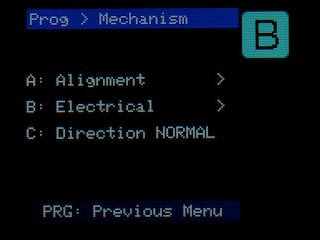
The receiver has a few global settings you can change. These are accessed from the "Mechanism" menu (press C on the main programming menu):
Alignment
This option exists for those situations where you've had to remove the turntable (or the drive unit) for maintenance, upgrades, or whatever; and when you've put it back together, the roads don't "quite" line up... Assuming the roads themselves haven't changed position in relation to each other and the turntable, and they are all wrong by the same amount, you can use the alignment option to re-align the entire turntable (all roads) to its new orientation.
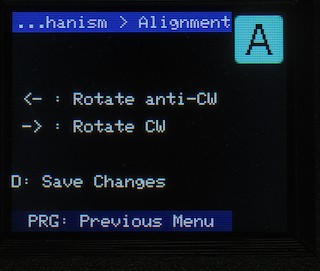
To achieve this, simply press "A" on the menu to see the alignment screen. Use the ACW and CW buttons to adjust the position of the turntable (just as if you were programming a road). Once you're happy with the new alignment, press "D" to save the changes.
The changes apply as soon as you save them, so you don't need to re-start the turntable or re-initialise, or anything like that.
Electrical
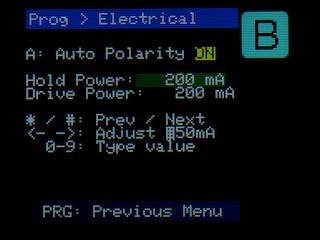
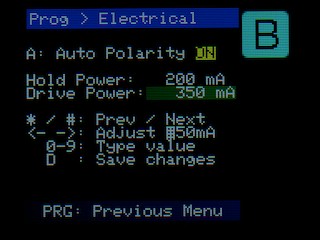
Select option "B" on the menu to adjust the auto-polarity settings, and the stepper drive power. The screen looks like this:
 Auto-Polarity switching
By default, the receivers will switch the track polarity if:
- A road is programmed to SWAP polarity, or
- The tail end of the turntable is sent to a road configured with NORMAL polarity.
This ensures you don't get any short-circuits when driving locos on or off the turntable.
If, for some reason, you don't need or want this function, you can switch it off (or back on) here by pressing "A". The receiver will set itself to "NORMAL" polarity (i.e. Rail A input is connected to Rail A output, B in to B out) and will not switch again until this setting is changed.
Hold Power
The * and # keys can be used to switch the highlighter between Hold and Drive power.
Hold power is the amount of power, in milliamps, that the stepper motor will consume whilst stationary. You can set this from any value between 50mA and 500mA, in 50mA increments.
To change the power level, either type the required number on the keypad (if the number you type is between 50 and 500; the controller will set to the nearest 50mA the value you type; if you type less than 50mA or more than 500mA, the value will revert to its existing setting. Alternatively, use the CW or ACW buttons to increase or decrease the value as required.
A 200mA power should be entirely adequate to hold an OO-gauge (or smaller) turntable stationary whilst locos move on/off it. We're waiting for feedback on some O-gauge turntables, and I'll update this page when we have news.
Drive Power
Drive power can be set between 50mA and 1500mA on the controller. This is the amount of power consumed by the stepper motor when the turntable is in motion.
Power levels above 650mA run a very real risk of overheating the stepper driver. In this case, no permanent harm is done, but your turntable will start to make some alarming clunking noises, will run jerkily, and will lose alignment, as the stepper driver will shut down to prevent thermal damage. If you experience this, please reduce the drive power level.
Testing has shown that 650mA is safe for continuous driving. Be aware that if you set the power level too high for the turntable to initialise without overheating, you WILL need to perform a factory reset to return it to its default parameters.
In general, N-gauge and OO-gauge turntables should work fine with the default power settings. We have had reports of some heavy O-gauge turntables requiring more power; hence this setting. If your turntable seems to need more power, please be sure to upgrade to v1.1.0 of the firmware & try a higher power setting.
Once you have changed any of the settings on this screen, an option "D" will appear to save the changes. You do not need to re-set the receiver after changing power levels, they are applied immediately.
Direction of Rotation
It is possible, depending on your stepper wiring, that the turntable will rotate in the wrong direction (i.e. the arrow shows it going clockwise, the actual turntable is turning anti-clockwise). Whilst this is rare, and could be fixed with wiring; it's easier to come to this screen and to press "C" to reverse the direction.
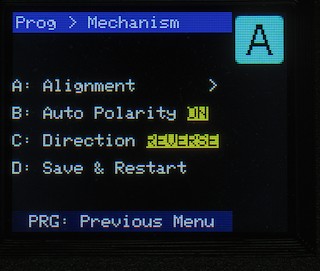
The screenshot is now out of date - "B" is now "Electrical", however, the Direction setting works in the same way as described here.
This will flip the direction the stepper motor is driven in, so the turntable moves as expected.
If you save this setting, the receiver must re-start & re-initialise. If you have already programmed roads, they will be in the wrong places!
As usual, you can press the PROG key to return to the previous menu - no outstanding changes will be saved if you do this.