
Receiver Settings
This page describes version 1.0.0 of the controller/receiver software. See the next page for v1.1.0
The receiver has a few global settings you can change. These are accessed from the "Mechanism" menu (press C on the main programming menu):
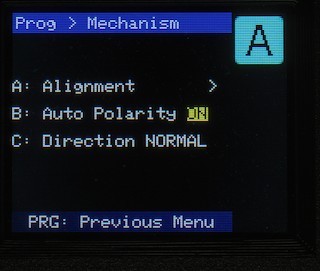
Alignment
This option exists for those situations where you've had to remove the turntable (or the drive unit) for maintenance, upgrades, or whatever; and when you've put it back together, the roads don't "quite" line up... Assuming the roads themselves haven't changed position in relation to each other and the turntable, and they are all wrong by the same amount, you can use the alignment option to re-align the entire turntable (all roads) to its new orientation.
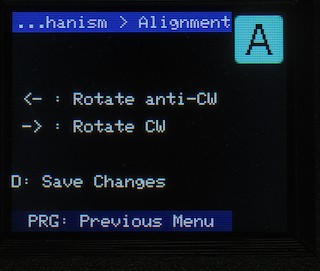
To achieve this, simply press "A" on the menu to see the alignment screen. Use the ACW and CW buttons to adjust the position of the turntable (just as if you were programming a road). Once you're happy with the new alignment, press "D" to save the changes.
The changes apply as soon as you save them, so you don't need to re-start the turntable or re-initialise, or anything like that.
Auto-Polarity switching
By default, the receivers will switch the track polarity if:
- A road is programmed to SWAP polarity, or
- The tail end of the turntable is sent to a road configured with NORMAL polarity.
This ensures you don't get any short-circuits when driving locos on or off the turntable.
If, for some reason, you don't need or want this function, you can switch it off here. The receiver will set itself to "NORMAL" polarity (i.e. Rail A input is connected to Rail A output, B in to B out) and will not switch again until this setting is changed.
Direction of Rotation
It is possible, depending on your stepper wiring, that the turntable will rotate in the wrong direction (i.e. the arrow shows it going clockwise, the actual turntable is turning anti-clockwise). Whilst this is rare, and could be fixed with wiring; it's easier to come to this screen and to press "C" to reverse the direction.
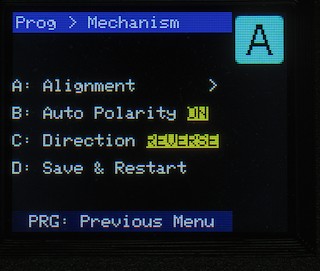
This will flip the direction the stepper motor is driven in, so the turntable moves as expected.
If you save this setting, the receiver must re-start & re-initialise. If you have already programmed roads, they will be in the wrong places!
As usual, you can press the PROG key to return to the previous menu - no outstanding changes will be saved if you do this.
No Comments